










When configuring high-speed fiber optic networks, the process can get complex, especially if you're trying to minimize costs by avoiding additional equipment like routers or switches. A common scenario involves an ISP providing a 10Gb point-to-point connection and a 1Gb WAN into a meet-me room.
The question arises: How can you split these connections into multiple firewalls in a server room without using a switch or router? One possible solution is using fiber splitters and MPO cassettes, but does this approach work? Let's break down the feasibility and explore the alternatives.
The Proposed Setup
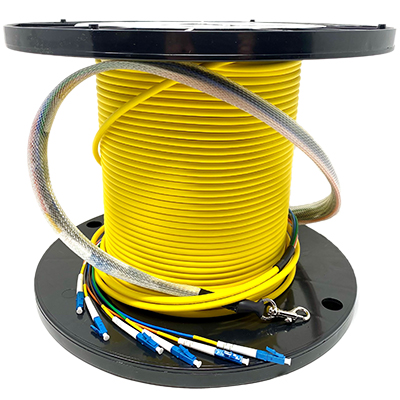
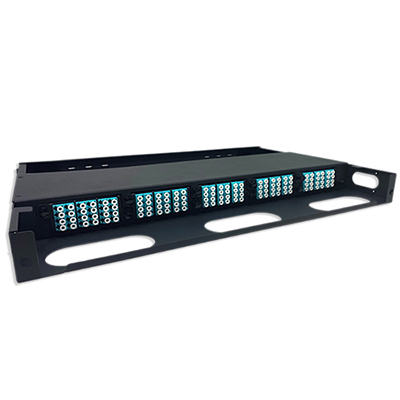
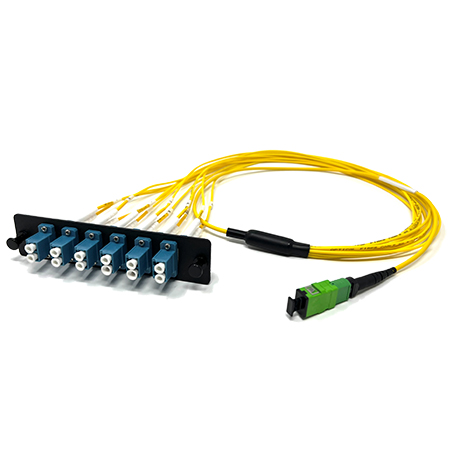
Here’s a possible configuration for this scenario:
-
PRO-769-S-DP-6: A 6-strand LC to LC fiber cable runs from the meet-me room to the server room.
-
QT-RMTB-SHD-5P: Two 12-port single-mode fiber (SMF) cassettes would connect to the back of an MPO port.
-
QT-12FSM-MTPO-APH: MPO cables would connect to a simple LGX patch panel, which would be used to route the fiber connections.
The goal of this setup is to connect each LC strand to a different firewall, effectively splitting the 10Gb and 1Gb connections into multiple firewalls in the server room. But will this method work without a switch or router? Let's find out.
Will This Configuration Work?
Unfortunately, the short answer is no, and here’s why.
1. Fiber Multiplexing and Demultiplexing
One might think that multiplexing — combining multiple signals into a single one — could be used to split the connection. Multiplexing can work when you have the right equipment on both ends to demultiplex the signals so they can be routed to individual devices. However, multiplexing doesn’t merge Ethernet traffic in the way a switch or router would.
The setup described would only create separate point-to-point connections between each fiber strand and a firewall. Essentially, this is still a dedicated connection for each firewall, not a shared fiber connection.
2. LC to MPO: Physical Splitting but Not Logical Splitting
While connecting LC fibers to an MPO cassette and routing them through a patch panel might appear to "split" the connection, this only happens at the physical layer. The fibers are merely organized into manageable groups, not combined or shared. In other words, you’re still working with independent point-to-point connections.
For example, the 10Gb point-to-point connection coming from the ISP can’t be split across multiple devices using this configuration. The MPO cassette would only help organize multiple fibers; it wouldn’t help manage data flow or route traffic.
3. The Need for a Switch or Router
At the core of this issue is the unavoidable need for a switch or router when dealing with Ethernet traffic over fiber. Even if you're trying to minimize costs by avoiding additional equipment, a switch is required to manage the data coming from the ISP and distribute it across multiple firewalls.
Without a switch, there’s no way to handle the Ethernet traffic and route it properly. Ethernet requires specific standards to communicate, and a switch ensures that each device can send and receive data without conflict. Without this, there would be data collisions, resulting in lost or delayed packets.
Why You Can't Avoid a Switch
Even though fiber optics allow for high-speed data transfer, they follow the same basic networking principles as traditional copper Ethernet connections. When dealing with a point-to-point fiber optic connection from an ISP, you can't simply split the connection among multiple devices. Each device would require its own dedicated connection to avoid interference.
This is where a switch comes in. For instance, a 10Gb connection could be fed into a 10Gb switch, which would then distribute that bandwidth to multiple firewalls, allowing each to access the ISP connection without conflicts. Trying to avoid this with MPO cassettes and fiber splitters won’t work because it doesn’t address the need to manage the Ethernet traffic.
Practical Alternatives
If cost is a concern and you're trying to avoid the higher expense of high-end network switches or routers, there are alternatives to consider that can still meet the technical needs:
Used or Refurbished Switches:
While new switches can be expensive, purchasing a refurbished or used switch could be a cost-effective option. Many refurbished devices perform just as well as new models and come with warranties.
Fiber-to-Ethernet Media Converters:
If the goal is to convert fiber connections into Ethernet, using media converters could provide a more affordable solution. These devices can convert fiber optic signals into Ethernet connections, allowing for easier management. However, you'll still need a switch to handle the traffic between multiple devices.
Direct-Attach Options:
If the firewalls are capable of handling direct fiber connections, you could explore direct-attach options. This would involve connecting each firewall directly to the fiber coming from the ISP. However, this option would require a separate fiber connection for each firewall, making it less feasible for large setups.
Conclusion
While the idea of using MPO cassettes and fiber splitters to avoid a switch is creative, it ultimately wouldn’t work as intended in this type of setup. Fiber optic connections can't be shared across multiple devices without the proper networking equipment. If you're dealing with Ethernet over fiber, a switch is necessary to manage the traffic and ensure each device gets the proper bandwidth.
Cost-conscious setups can still be achieved by considering alternatives like refurbished switches or media converters. However, avoiding a switch entirely is not feasible when dealing with Ethernet-based fiber connections.
In summary, when designing a fiber network, it’s crucial to understand that while multiplexing and physical cabling solutions like MPO cassettes can help organize connections, they don’t replace the need for switches or routers to handle data flow and device communication. Understanding this can save time and resources, ensuring your network operates smoothly and efficiently.