










What is a Server Rack?
Server Rack is typically made of steel or aluminium, rails and framework, it is capable of holding hundreds or even thousands of pounds of equipment. The server rack is designed to house, organize and secure servers, networking equipment and other IT hardware. It provides efficient cable management, air flow and physical protection for sensitive electronic devices. IT server racks are generally used in data centers, offices and home setup for housing computing and networking equipment.
Purpose of Server Rack
As server rack is primarily used as a standardized framework for organizing and housing various IT equipment, including servers, networking devices, storage systems and other hardware components. These racks provide a centralized location for deploying and managing IT infrastructure within data centers, server rooms or network closets.
Main Purposes of a Server Rack:
Equipment Organization:
Server racks offer a structured environment to house IT equipment in a neat and organized manner. Obviously you don’t want to keep your electronic equipment in disarray and lying out in open space making them prone to damage and malfunction. These enclosures allow maximum utilization of space and improving accessibility for maintenance and troubleshooting tasks.
Space Optimization:
By vertically stacking multiple servers and other hardware components in a compact enclosure, server racks enable efficient use of available floor space. This is particularly beneficial in environments where space is limited such as data centers or server rooms.
Cooling and Airflow Management:
Server racks are designed with air flow patterns and ventilation systems to ensure proper cooling of IT equipment. They feature perforated doors, side panels and adjustable mounting rails and above all intelligent sensor enabled fans to facilitate airflow and prevent overheating of servers and other devices.
Cable Management:
Server racks include built-in cable management features such as cable trays, routing channels and cable ties to organize and route cables effectively. This helps in minimizing cable clutter, reducing the risk of cable damage and simplifying maintenance tasks.
Uninterruptible Power Supply (UPS):
Many server racks will allow you to install a dedicated server grade UPS to ensure the enclosed hardware keeps functioning in case of power loss from the mains.
Power Delivery Unit (PDU):
Server racks usually also house a PDU for managing power delivery to the installed equipment with ease and without cable clutter and offers a centralized power management. A PDU is device that offers multiple power outlets that you can plug your equipment in.
Equipment Protection:
Server racks provide a secure and stable enclosure for housing valuable IT assets, protecting them from physical damage, dust and unauthorized access. Racks may include locking doors, side panels and security locks including biometric enabled locks to safeguard equipment from theft and tampering.
Common Server Rack Types
Server racks are generally divided into two broad categories: rack enclosures (or rack cabinets) and open-frame racks.
Featured Products
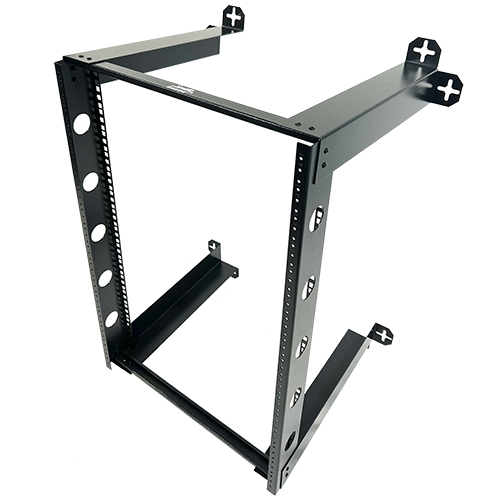
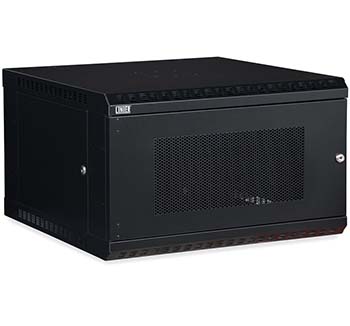
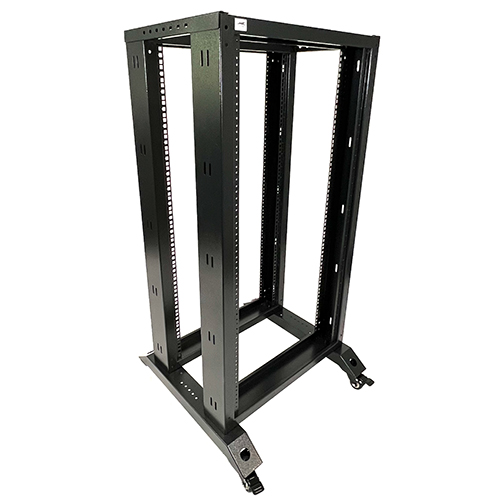
Based on the use of these sever racks, rack enclosures and open-frame racks are further divided into floor-standing server rack and wall-mount server rack.

Open Frame Racks: These kind of server racks are best choice in such an environment when you have to frequently access the hardware, switches and other devices in your daily routine. It also provides efficient ventilation and air flow to maintain the adequate cooling for the operational working of sensitive equipment. While these racks provide ease of access on the other hand you have minimum security of the equipment installed in these racks due to their open design. These racks a usually cheaper than their enclosed counterparts.

Enclosed Racks (Cabinets): Enclosed racks also referred as cabinets offer several advantages like increased security by preventing unauthorized access, protection from dust and debris and better environmental control. The disadvantage of these racks include limited accessibility for maintenance and potentially higher costs compared to open racks.

Wall Mount Server Racks: A wall mount rack isa compact enclosure that holds network equipment and is mounted on a wall.They are also known as wall mount cabinets or wall mount enclosures. Wall mounted racks are a good idea when you don’t want frequent access to your installed equipment and want to keep your hardware out easy ground level reach.These are suitable when space is limited, such as in home offices or small businesses. Keep in mind that wall mount racks are not usually designed to hold a lot of server/ networking equipment tonnage.
Portable Server Racks: A portable server rack isa movable storage unit for IT equipment that can be easily moved to different locations.They are often used for temporary setups, such as trade shows, disaster recovery, and film production.Portable racks have wheels or handles to make them easy to move.Some racks have doors and side panels to protect equipment from dust and unauthorized access and they are designed to protect equipment during transportation. Moreover, these racks have additional features to improve airflow and cooling.

Server Rack Size, Depth, And Rack Unit (U)
Server racks come in different sizes and dimensions. Key measurements include:
-
Rack Unit (U): In context to Server Racks, “U” stands for “rack unit”, which is a standard unit of measurement used to described the height of equipment to be mounted within the rack; one “U” is equal to 1.75 inches (44.45mm), So a “1U” server rack would be 1.75 inches tall, a “2U” would be 3.5 inches tall and so on while the width will be standard 19 inches in all cases. Brief detail of Devices compatible with different range of rack server is as follows:
1U – Compact devices like network switches, routers and lower power servers can be mounted in 1U rack.
2U – This rack accommodates mid-size servers and equipment with greater processing power, balancing performance and size.
3U – This rack provides ample room for high performance hardware and better cooling for demanding applications.
4U – This rack designed from larger systems, including storage devices and advanced computing setups that require maximum flexibility and expansion.
|
Rack Size |
Height (inches) |
Height (mm) |
Applications |
|
1U |
1.75 |
44.45 |
Compact servers, routers, switches, hubs etc |
|
2U |
3.5 |
88.9 |
Mid-range servers, firewalls |
|
3U |
5.25 |
133.35 |
High performance servers |
|
4U |
7 |
177.8 |
Storage, NAS, large-scale servers |
-
Depth: Standard depths range from 600mm to 1200mm, depending on the equipment size.
-
Width: Typically, 19 inches, which is the industry standard for most rack-mounted equipment.
Types of Racks by Application
Data Center Server Racks: are specially designed enclosures used to house servers, networking equipment, and other IT hardware in a data center environment where the efficient space management and security is of utmost importance. These racks provide organization, security, and efficient cooling to ensure optimal performance and reliability.
Key Features of Data center Server Racks:
-
Standardized Sizes
-
Typically, 42U to 48U in height, but larger configurations are available.
-
Depth varies from 600mm to 1200mm to accommodate different server models.
-
Width is usually 19 inches, the industry standard for rackmount equipment.
-
Enhanced Cooling and Ventilation
-
Perforated doors for improved airflow.
-
Built-in cooling mechanisms like fan trays and chimney systems.
-
Supports hot and cold aisle containment to optimize airflow and prevent overheating.
-
Security and Access Control
-
Lockable front and rear doors to prevent unauthorized access.
-
Keycard or biometric access systems for high-security environments.
-
Tamper-proof side panels to protect sensitive equipment.
-
Cable Management and Power Distribution
-
Integrated cable routing trays to reduce clutter and improve maintenance.
-
Power Distribution Units (PDUs) to manage power supply efficiently.
-
Uninterruptible Power Supply (UPS) support to prevent downtime during outages.
-
Scalability and Modular Design
-
Designed for easy expansion with additional racks.
-
Compatible with rackmounts, sliding shelves, and KVM switches.
-
Adjustable mounting rails to fit different server depths.
Why Use Data Center Server Racks?
-
Space Optimization: Maximizes the use of physical space in data centers.
-
Improved Cooling Efficiency: Prevents server overheating, extending hardware lifespan.
-
Security & Protection: Keeps equipment safe from physical damage and unauthorized access.
-
Easy Maintenance: Organized layout makes hardware troubleshooting and upgrades easier.
-
These racks will provide you with a built in display and keyboard/mouse for easier server(s) management.
Network Server Racks: While server racks are made with idea of installing various types of server and network equipment, Network racks are specially designed enclosures used to house networking equipment such as switches, routers, patch panels, and modems. These racks help organize and secure networking infrastructure while ensuring proper airflow and cable management.
Key Features of Network Server Racks:
-
Optimized for Networking Equipment
-
Designed primarily for networking devices rather than full-sized servers.
-
Typically shallower in depth compared to standard server racks.
-
Includes rackmounts for patch panels and cable organizers.
-
Efficient Cable Management
-
Built-in cable routing trays and management panels.
-
Proper spacing to prevent tangled and cluttered cabling.
-
Allows easy access for maintenance and upgrades.
-
Ventilation & Airflow
-
Open-frame or perforated door designs for enhanced cooling.
-
Ensures heat dissipation to prevent equipment overheating.
-
Some models include fan mounts for additional cooling support.
-
Security & Accessibility
-
Lockable doors to prevent unauthorized access.
-
Wall mount server rack options for space-saving and security.
-
Enclosed network server rack models offer dust protection.
-
Variety of Sizes
-
Available in 12U, 24U, 42U, and other sizes depending on the networking setup.
-
Compact wall mount network server racks are ideal for small office installations.
Why Use a Network Server Rack?
-
Better Organization: Keeps networking devices neatly arranged.
-
Improved Performance: Ensures proper cooling and airflow.
-
Space Efficiency: Offers compact solutions for small or large businesses.
-
Easy Maintenance: Simplifies troubleshooting and equipment upgrades.
-
Security: Keeps sensitive and mission critical equipment out of unauthorized reach.
Audio-Visual (AV) racks: are specially designed enclosures used to house and organize AV equipment, such as amplifiers, mixers, media servers, patch panels, and signal processors. These racks ensure efficient cable management, cooling, and accessibility while protecting delicate AV components from damage.
Key Features of AV Racks:
-
Standardized Rack Sizes
-
Most AV racks follow the 19-inch standard width, compatible with various AV equipment.
-
Available in multiple heights, typically 12U, 24U, 42U, and more, depending on setup needs.
-
Depth varies based on equipment size, with shallow racks for small devices and deeper racks for large amplifiers.
-
Optimized Ventilation & Cooling
-
Ventilated panels or perforated doors to prevent overheating.
-
Options for fan cooling or built-in thermal management systems.
-
Open-frame AV racks allow maximum airflow for high-heat-generating components.
-
Secure & Accessible Design
-
Lockable doors and side panels for security and dust protection.
-
Sliding or rotating shelves for easy access to equipment.
-
Open-frame designs for quick access and flexibility in cable routing.
-
Cable Management & Power Distribution
-
Built-in cable routing trays to reduce clutter and improve organization.
-
Dedicated power distribution units (PDUs) for clean power delivery.
-
Options for surge protection to safeguard expensive AV equipment.
-
Types of AV Racks
-
Freestanding AV Racks: Ideal for studio, theatre, and professional AV installations.
-
Wall-Mount AV Racks: Space-saving option for offices, conference rooms, and home theatres.
-
Portable AV Racks: Used for live events, concerts, and broadcasting, often featuring wheels for mobility.
Why Use an AV Rack?
-
Better Equipment Organization: Keeps AV components neatly arranged and easily accessible.
-
Enhanced Cooling & Longevity: Protects equipment from heat damage, extending lifespan.
-
Improved Cable Management: Reduces clutter and simplifies troubleshooting.
-
Security & Protection: Prevents unauthorized access and physical damage.
Difference between a Server Rack and a Network Rack
|
Feature |
Network Rack |
Server Rack |
|
Purpose |
Designed for networking equipment, such as switches, routers, patch panels and modems. |
Built for servers, storage devices and heavy computer hardware. |
|
Depth |
Typically, shallower (usually 24 inches or less). |
Deeper (usually 30 to 48 inches) to accommodate large servers. |
|
Equipment Supported |
Holds lightweight devices like network switches, routers, firewalls etc. and cables. |
Supports heavy and deep equipment, including rack-mounted servers, power distribution units (PDUs) and cooling systems. |
|
Ventilation |
Usually open-frame for better airflow. |
Comes with vented doors and cooling fans for heat dissipation. |
|
Weight Capacity |
Lower weight capacity as it holds smaller devices. |
Higher weight capacity for security and better colling. |
|
Design |
Often open-frame or wall-mounted for easy cable management. Usually are small to medium in size. |
Typically enclosed for security and better cooling. Server racks are free standing and are medium to large in size. |
|
Security |
Less secure as most are open-frame designs. |
More secure with lockable doors and side panels. |
|
Accessibility |
Switches and Routers are generally fixed with bolts or latches. |
Offers sliding rails rackmounts to slide servers in and out of rack body. Some low cost racks also provide metal sheets that rest on rackmounts to place servers on. |
|
Cost |
Generally cheaper due to simpler structure. |
More expensive due to enhanced security and durability. |
Which One to Choose?
-
Choose a Network Rack if you need to organize and manage networking hardware like switch and routers.
-
Choose a Server Rack if you require a secure, high-capacity enclosure for servers, storage, and high performance computing.
What to Consider When Buying a Server Rack
It is most significant to choose right server rack which suits to your working environment, hardware and business applications besides provide cooling/ventilation to mounted hardware along-with prevention form unauthorized access. Here are some key points which you consider while buying server rack:
1. Determine the Right Size & Rack Units (U)
-
Measure the height, width, and depth of your equipment.
-
Consider future expansion and choose a slightly larger server rack if needed.
-
Standard sizes range from 1U / 2U for small setups to 42U or 48U for large data centers.
2. Load Capacity & Weight Support
-
Check the rack’s weight capacity to ensure it can hold your hardware securely.
-
If you have heavy servers, opt for a robust IT server rack with reinforced frames.
3. Choose Between Open Frame or Enclosed Rack
-
Open Frame Racks: Best for easy access and airflow. Ideal for cooling-heavy environments.
-
Enclosed Racks (Cabinets): Provide security and protect equipment from dust and tampering.
4. Consider Cooling & Ventilation
-
Proper airflow prevents overheating. Look for racks with:
-
Perforated doors or side panels
-
Built-in fan mounts
-
Ventilation channels
5. Cable Management Features
-
A well-organized server rack should have:
-
Cable trays and management arms
-
Sufficient space for routing power and network cables
-
Rear access for maintenance
6. Security Requirements
-
If security is a concern, choose a lockable network server rack with:
-
Key locks or digital access control
-
Tamper-proof side panels
-
Enclosed design for restricted access
7. Rack Mounting Options
-
Freestanding Racks: Ideal for large server rooms or data centers.
-
Wall Mount Server Racks: Space-saving option for small offices or branch locations.
-
Portable Racks: Best for mobile or temporary setups.
8. Future-Proofing & Scalability
-
Consider racks with extra space to accommodate additional hardware.
-
Choose modular designs that allow expansion or adjustments.
Conclusion
The IT management of a business must choose the right server by considering key factors such as size/width, equipment depth, security requirements, rack mounting options, future hardware needs for new business processes and above all the cost factor. It must be ensured that the selected server rack provides proper ventilation and cooling for the mounted hardware while also preventing unauthorized access, theft, and tampering. A portable server rack solution should be chosen if the equipment needs to be moved to different locations for business processes. Without a proper rack whether server or network your precious equipment stand is at risk of being fiddled by a host of threat actors and environmental factors.