










For your setup of IP camera "clusters," you're facing a challenge with the distance limitations of Cat5/6 cables and the need for PoE (Power over Ethernet) for the cameras. Here's a breakdown of solutions and advice based on your scenario and the feedback from others:
Problem Recap:
- You have clusters of IP cameras spaced about 200 feet apart, with the final cluster roughly 600 feet away from the network closet or NVR.
- The goal is to provide data connectivity and PoE to the cameras over a distance that exceeds the 300-foot limitation of Cat5/6 Ethernet cable.
- You're considering daisy-chaining small switches, but understand it's not the preferred approach.
Best Solutions:
-
Centralized PoE Switch Location:
- Solution: Position a centralized PoE switch at the midway point between the closet and the farthest camera. This switch would serve as a distribution point, supplying power and connectivity to the cameras via shorter Ethernet runs.
- Advantage: Keeps you within the 300-foot distance limit and avoids daisy-chaining switches, which can lead to network instability, especially for critical systems like surveillance.
-
Fiber Runs to Each Camera Cluster:
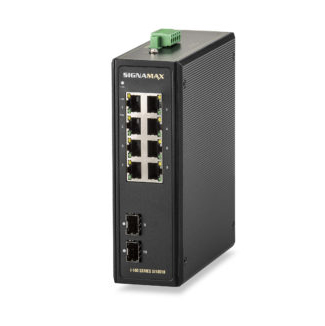
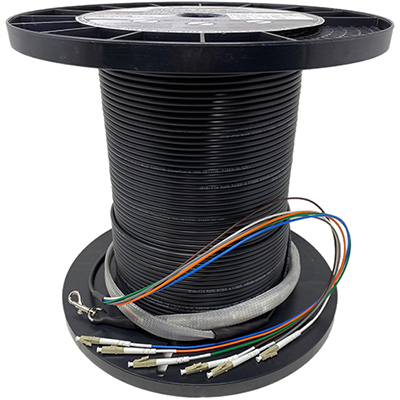
- Solution: Install fiber between the network closet and each cluster, terminating at an 8-port PoE switch at each cluster location. From the switch, you can run Ethernet cables to each camera.
- Advantage: Fiber runs are immune to the 300-foot limitation, offering superior data transmission over long distances without degradation. You’d also avoid potential issues with multiple chained switches. Additionally, fiber provides better future-proofing as it can handle higher bandwidth demands as camera resolutions and frame rates increase.
- Disadvantage: This may require hiring professionals for fiber installation if you don't have in-house expertise, though it can be a long-term cost-saving solution by reducing the need for ongoing maintenance or troubleshooting.
-
Extend Ethernet with Media Converters (Ethernet to Fiber):
- Solution: Use Ethernet-to-fiber media converters at key points in the setup, extending the range beyond 300 feet. This way, you maintain Ethernet at the endpoints but bridge the long distances using fiber.
- Advantage: This solution is less expensive than installing switches and only requires media converters and fiber cables at key points. It extends the Ethernet range without needing to change the camera equipment, which might not support fiber natively.
- Disadvantage: While cheaper, media converters add extra points of failure, and depending on the quality, could potentially reduce the system's reliability.
Considerations for Each Approach:
-
PoE Power Budget:
- If using PoE switches to power the cameras, ensure that each switch can supply enough power for all the cameras in the cluster, taking into account the total number of cameras and their power requirements. Higher resolution or PTZ (pan-tilt-zoom) cameras tend to require more power.
-
Bandwidth and Traffic:
- Cameras, especially high-resolution ones (4.1 Megapixels or higher), can consume significant bandwidth. Ensure that the PoE switches and the uplinks (fiber or Ethernet) can handle the data load without introducing latency or packet loss, particularly if the cameras are streaming video to a central location.
-
Daisy-Chaining Switches:
- Why It's Frowned Upon: Daisy-chaining switches creates multiple points of failure and adds to network complexity. If one switch in the chain fails, everything downstream also fails. Additionally, this setup could introduce latency, jitter, and potential broadcast storms if not properly managed, which is critical for video surveillance systems.
- Better Alternative: As recommended earlier, running dedicated fiber links between the closet and each cluster or using a star topology with fiber and PoE switches minimizes these risks and offers greater reliability.
-
Cost vs. Longevity:
- While fiber installation might seem expensive upfront, it’s often more cost-effective in the long run. You'll avoid future disruptions, maintenance, or troubleshooting associated with poor daisy-chain setups. Fiber also future-proofs your network for higher bandwidth and greater scalability.
Featured Products
Final Recommendation:
For long-term stability and ease of management, running fiber to each camera cluster and installing small PoE switches at those locations is the optimal approach. If budget is a concern, consider running fiber to at least the furthest point and using media converters for intermediate connections. This gives you the benefits of fiber while controlling costs.
Example Layout:
- Closet → Fiber → PoE Switch at 200' (Cluster 1) → Ethernet to Cameras.
- Fiber from Cluster 1 → PoE Switch at 400' (Cluster 2) → Ethernet to Cameras.
- Fiber from Cluster 2 → PoE Switch at 600' (Cluster 3) → Ethernet to Cameras.
By following this structure, you’ll ensure a reliable connection, adequate power, and future scalability for your IP camera system.